Hundreds of free VPN and proxy extensions on Chrome are showing a familiar but often overlooked lesson: a tool marketed as protecting privacy can also become a concentration point for risk if users do not verify its origin, permissions, and the infrastructure behind it.
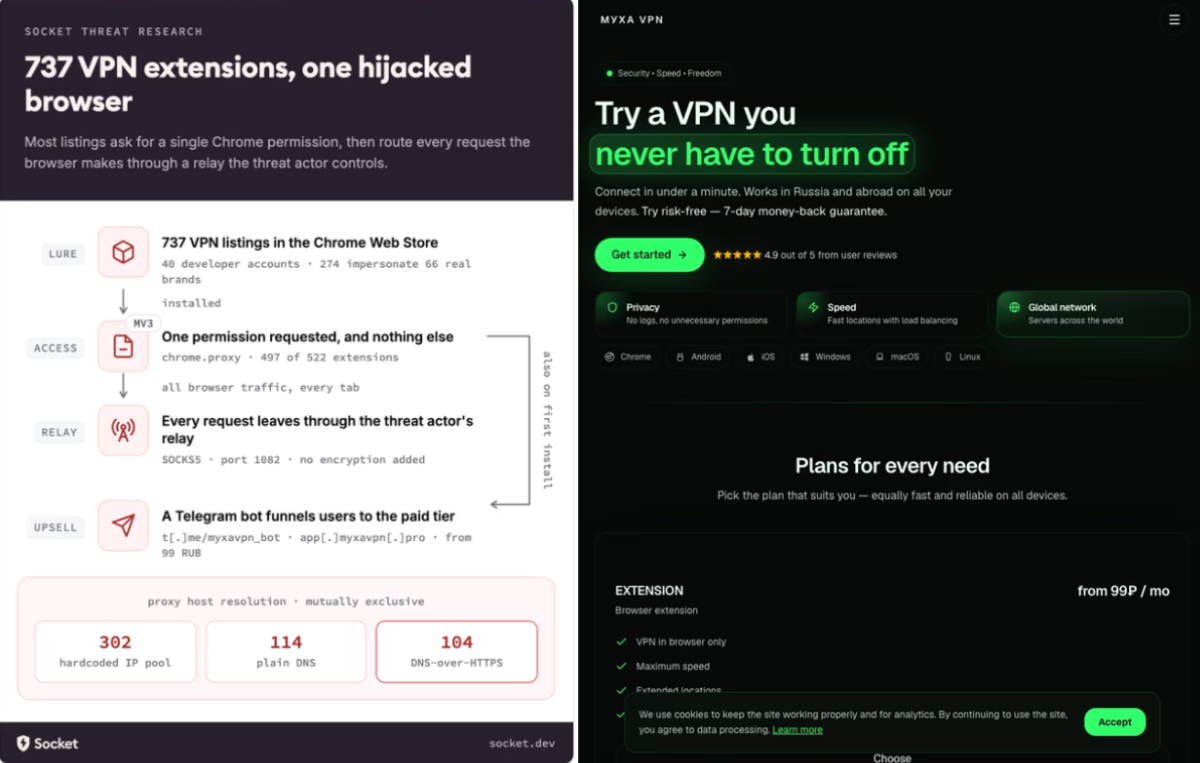
The Hacker News, citing research from Socket, reported that 737 VPN and proxy extensions on the Chrome Web Store primarily targeted Russian-speaking users seeking access to blocked services. Together, the extensions had 75,486 installs, while 274 of them were found impersonating 66 well-known VPN and privacy brands, including Proton VPN, NordVPN, Surfshark, AdGuard VPN, ExpressVPN, CyberGhost, Windscribe, TunnelBear, Cloudflare 1.1.1.1, and Google Outline.
The issue is not just the word VPN
A legitimate VPN can route traffic through an intermediary server to hide an IP address, bypass geographic restrictions, or protect a connection on public networks. However, when a browser extension configures a proxy without clearly disclosing who operates it, where the servers are located, what logging policy applies, and how data is processed, users are effectively placing their browsing sessions in the hands of a third party that is difficult to verify.
In the campaign analyzed by Socket, most extensions configured chrome.proxy.settings to route the entire browser session through a fixed SOCKS5 server on port 1082. Researcher Kush Pandya said 520 of the 522 samples in the larger cluster routed traffic through the same SOCKS5 infrastructure. That puts the proxy operator in a position to observe destination sites, source IP addresses, TLS SNI values, and any content sent over unencrypted HTTP.
Why brand impersonation sharply increases the risk
An anonymous proxy service is already concerning, but impersonating a recognized brand makes the risk spread further. Users may believe they are installing an extension from a legitimate VPN provider, while in reality the extension is published by a different developer account, uses different infrastructure, and behaves unlike the official product.
According to The Hacker News, the extensions were published through at least 40 Chrome Web Store accounts. Notable indicators included advertising paid plans or server locations that did not exist, bypassing DNS-over-HTTPS blocklists, displaying fake connection states even when the connection failed, adding remote configuration after the extension had already been approved, and submitting similar descriptions to the review process while claiming that no data was transmitted to external servers.
The danger of an adversary-in-the-middle position
When a browser is configured to pass through an attacker’s proxy, the risk does not necessarily require full HTTPS decryption. Merely seeing destinations, access timing, source IP addresses, behavior patterns, and unencrypted HTTP requests can be enough to create sensitive intelligence. For users who regularly access bank accounts, e-wallets, work tools, or internal systems, this metadata can support activity profiling and targeted phishing campaigns.
Socket stressed that the extension code alone does not prove whether the operators directly owned the proxies or resold capacity from another provider. In either case, users still routed browser traffic through an intermediary layer that was not clearly disclosed.
How users should evaluate browser extensions
Before installing a VPN extension, users should verify the developer page, the brand’s official website, unusual review patterns, update history, and the permissions requested by the extension. In Chrome, extensions that can modify proxy settings, read data on websites, or run on every page deserve extra scrutiny because they can directly affect how the browser connects to the Internet.
Users who have installed free VPN extensions should review their extension list, remove anything with an unclear publisher, change passwords for important accounts if those accounts were used on suspicious connections, and prioritize downloads from the provider’s official website. In enterprise environments, administrators should enforce allowlists, monitor browser proxy changes, and alert when new extensions request sensitive permissions.
The lesson for the extension ecosystem
The Hacker News reported that 221 extensions had been removed from the Chrome Web Store, while the remaining 516 were still observed as active at the time of the original report. That number shows that marketplace review cannot fully replace risk assessment by users and organizations.
For tools labeled as security products, such as VPNs, proxies, password managers, or anti-tracking extensions, trust should not rest on the name alone. What matters more is a verified publishing source, a clear business model, a transparent privacy policy, a credible update history, and permissions that match the tool’s actual function.
VNCyberS synthesized from The Hacker News and Socket









 Tiếng Việt
 English