Hirudo là trojan ngân hàng Android mới kết hợp đánh cắp thông tin đăng nhập với điều khiển thiết bị theo thời gian thực. Thay vì chỉ phủ giao diện giả lên ứng dụng thật, mã độc còn gỡ ứng dụng ngân hàng hợp pháp rồi cài một bản đã bị chỉnh sửa, qua đó can thiệp các cơ chế bảo vệ ngay bên trong tiến trình của ứng dụng.
New Findings from ThreatFabric
On October 14, 2026, ThreatFabric's Mobile Threat Intelligence team published its analysis of Hirudo. Researchers identified eight malicious copies of apps from seven Indonesian banks and found credential target lists covering China, India, Mexico, Morocco, and Thailand. The fake checkout interface also used Malaysian bank and wallet branding.
ThreatFabric says backend data captured in August 2026 contained thousands of credential, device, lock-screen history, and financial-profile records. However, the number of unique victims remains unknown, so these figures should not be interpreted as the total number of compromised people.
Lure Apps Conceal the Malicious Payload
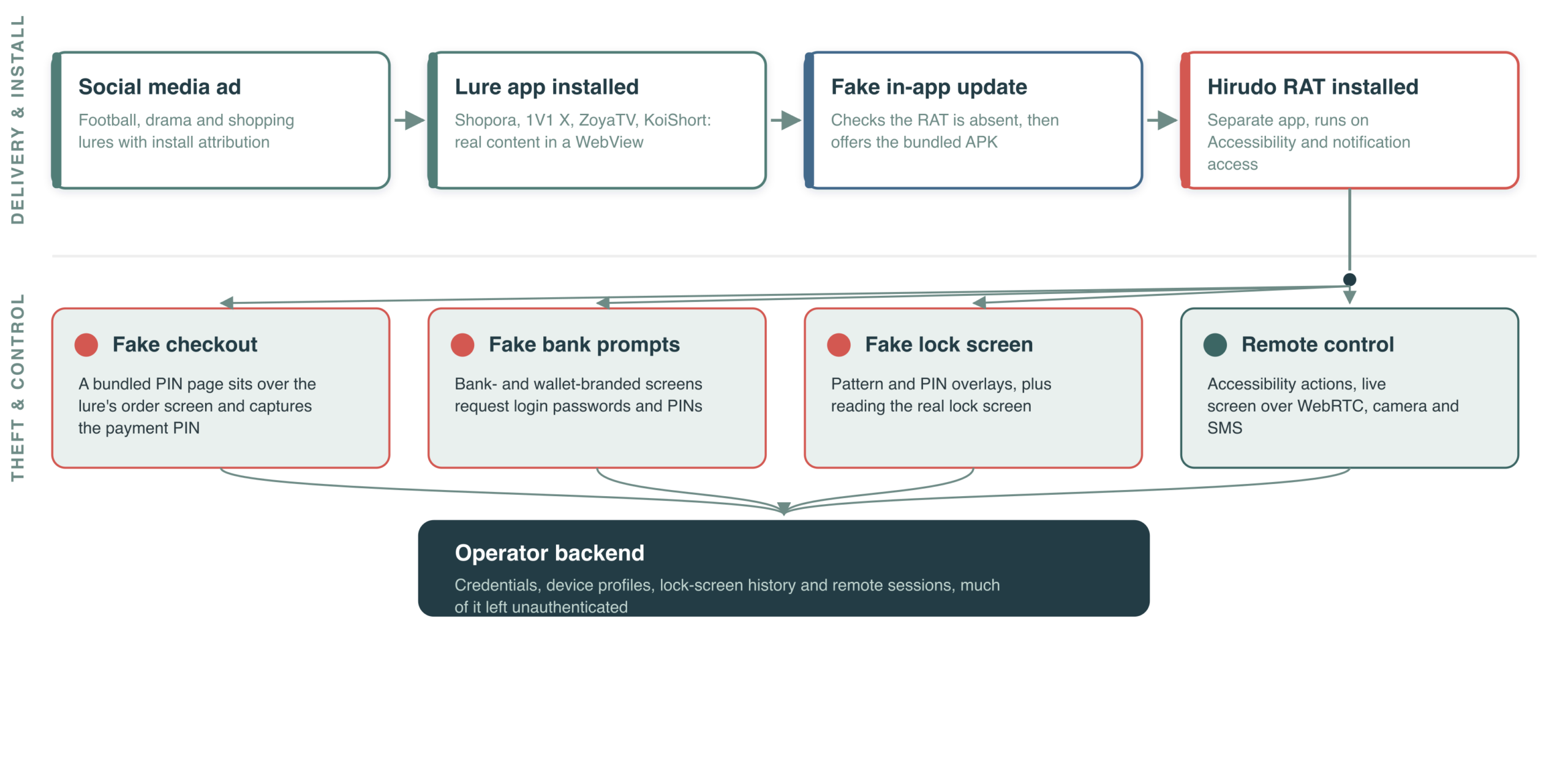
The infection chain begins with the Shopora shopping app, the 1V1 X adult-content app, or the ZoyaTV and KoiShort short-drama platforms. These apps display real content through a WebView to appear legitimate, while silently checking the Hirudo payload's status and presenting a fake 'update' prompt.
If the user agrees, a second APK is installed and requests Accessibility and notification-access permissions. One variant also creates a blackhole VPN during installation to cut IPv4 traffic, making it harder for the user to inspect or interrupt the process through a normal network connection.
From PIN Theft to Phone Takeover
When a victim makes a payment in the lure app, Hirudo places a transparent checkout page over the order interface. The PIN is sent to the operator's server while the app displays a fake success result to conceal the theft.
The malware can also collect banking passwords, device-unlock secrets, and SMS messages; stream the screen over WebRTC; capture screenshots; record audio; and access the front or rear camera. Linking stolen data to the device and target app helps attackers organize fraud on a per-victim basis.
The Turning Point: Replacing the Genuine Banking App
Hirudo maintains a list of 42 financial apps, but at the time of analysis only eight Indonesian apps had dedicated replacements. When it detects a matching app, the malware checks its certificate, opens the genuine app's uninstaller, downloads the modified version, and uses Accessibility to drive the installation process.
The fake retains the banking app's package name and most of its code but is signed with a public test key. Because the signatures differ, Android will not allow an in-place update, forcing the attacker to remove the genuine app first. This is also a weakness in the attack chain because the user can stop the process during removal or installation authorization.
Hooking Engine Blinds Security Controls
In the modified app, one line is injected into the Application class to load a hooking engine based on YAHFA and Dobby. Once activated, the engine can return a forged valid signing certificate, hide the Accessibility service, remove the screenshot-blocking FLAG_SECURE flag, and relay Play Integrity requests through an attacker-controlled server.
This technique turns security answers generated by the app itself into attacker-controlled data. Even so, ThreatFabric confirmed that at least two certificates in the leaked keybox appear on Google's revocation list, meaning server-side revocation checks can still detect the forgery.
Distribution Infrastructure and Target Scope
The APKs were distributed through Amazon CloudFront and tied to advertising campaigns through OpenInstall and Meta Pixel. Some download routes remained active in October 2026. Researchers also found an unauthenticated APK-processing panel that exposed operator storage and credentials.
Indonesia is the center of the app-replacement operation, but the code and interfaces show that the toolkit can be reused across multiple countries. This presents a notable risk in markets where sideloading APKs outside official stores is common.
Recommendations for Banks and Financial Institutions
- Verify Play Integrity and device attestation server-side, binding results to the session and protected action instead of trusting local signals alone.
- Check certificate revocation lists and treat missing behavioral data as a risk signal.
- Maintain behavioral analytics and transaction controls at login, account recovery, beneficiary creation, and payment approval.
- Do not use Accessibility state or screenshot blocking alone as decisive controls because a modified app can falsify these signals.
What Should Android Users Do?
Users should install banking and entertainment apps only from Google Play or official provider channels, enable Play Protect, and keep devices updated. If a phone unexpectedly asks to remove and reinstall a banking app, grant Accessibility, install an APK, or disable protection, stop immediately and contact the bank through an independent channel.
If compromise is suspected, disconnect the device, use a clean device to change credentials, report and terminate active sessions and suspicious transactions, then back up essential data before resetting the phone. Do not continue banking on a device that shows signs of remote control.
Lessons from Hirudo
Hirudo shows that in-app security checks are no longer sufficient when the app itself can be replaced. Effective defense must combine trusted installation sources, server-side attestation, behavioral assessment, and layered transaction controls.
For users, the clearest warning sign is an ordinary app requesting an APK 'update' and Accessibility permission. For financial institutions, assuming that local signals can be manipulated is essential to designing more resilient fraud defenses.
VNCyberS compiled from ThreatFabric and BleepingComputer













 Tiếng Việt
 English